Chapter 1 - Basic Configuration
===============================
Two methods are available for setting up this bundle:
* Using basic configuration explained here
* [Using a service for a most advanced configuration](2-service-configuration.md)
### Under the key `conf` you have all your different file manager configurations.
| Option | Type | Required |
| :--- |:--------:|:--------:|
| `conf` | `Array` | True |
Example:
```yml
artgris_file_manager:
conf:
public: ...
myprivatefolder: ...
onlypdf: ...
anystring: ...
...
```
### For each `conf` you have following options:
## `dir` directory path
| Option | Type | Required |
| :--- |:--------:|:--------:|
| `dir` | `String` | True |
Example with a Public folder :
```yml
artgris_file_manager:
conf:
public:
dir: '../web/uploads'
```
>Browse the `/manager/?conf=public` URL to get access to this File Manager
>"../web/" or "../public/" (symfony 4) in dir path are required to get 'public' image urls otherwise filemanager thinks it's a private directory.
Example with a Private folder :
```yml
artgris_file_manager:
conf:
private:
dir: '../private'
```
>Browse the `/manager/?conf=private` URL to get access to this File Manager
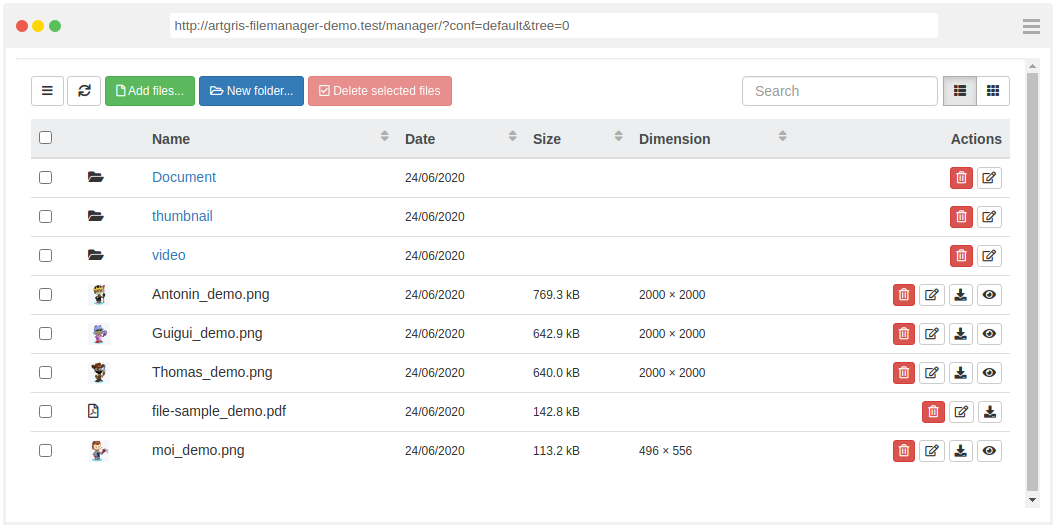
## `tree` Display Folder Tree
| Option | Type | Required | Default value |
| :--- |:--------:|:--------:|:--------:|
| `tree` | `Booleen` | False | true |
Example with `tree` = false
 ## `view` Display Mode Type
| Option | Type | Required | Possible values | Default value |
| :--- |:--------:|:--------:|:------------------------:|:-------------:|
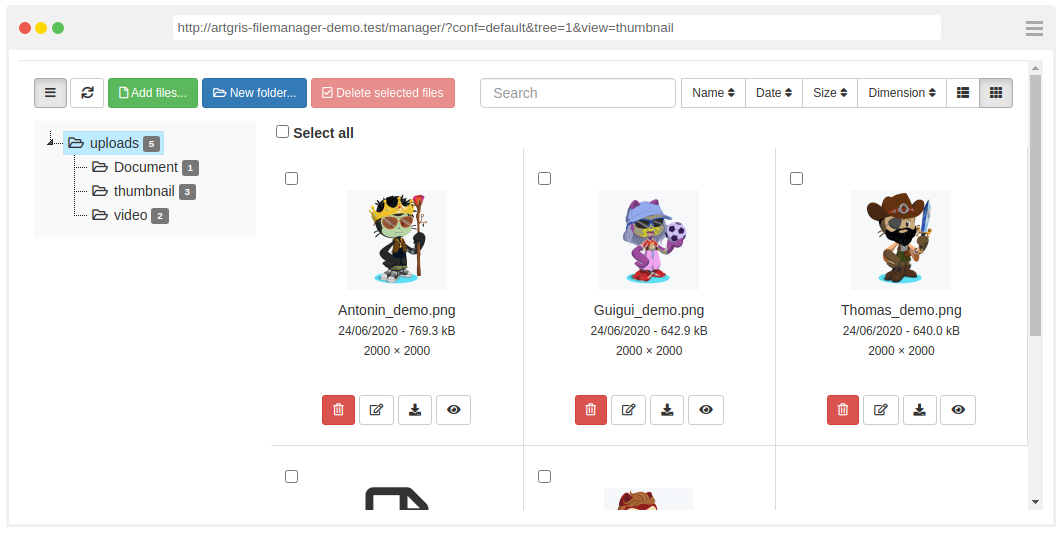
| `view` | `String` | False | `thumbnail`, `list` | `list` |
Example with `thumbnail`
## `view` Display Mode Type
| Option | Type | Required | Possible values | Default value |
| :--- |:--------:|:--------:|:------------------------:|:-------------:|
| `view` | `String` | False | `thumbnail`, `list` | `list` |
Example with `thumbnail`
 ## `type` Basic file restriction
| Option | Type | Required | Possible values | Default value |
| :--- |:--------:|:--------:|:------------------------:|:-------------:|
| `type` | `String` | False | `file`, `image`, `media` | `file` |
Example:
```yml
artgris_file_manager:
conf:
public:
...
type: 'media'
```
Regex rules used:
`media`: `/\.(mp4|ogg|webm)$/i` Accept basic HTML video media types (.mp4, .ogg and .webm)
`image:`: `/\.(gif|png|jpe?g|svg)$/i` Accept basic HTML image types (.gif, .png, .jpg, .jpeg and .svg)
`file`: `/.+$/i` Accept all files with an extension (.pdf, .html, ...)
>If `type` option is not sufficient for you, You can defined your own `regex` rules and `accept` [(HTML input accept attribute)](https://www.w3schools.com/tags/att_input_accept.asp):
## `regex` and `accept` Advanced file restriction options
| Option | Type | Required | Default value |
| :--- |:--------:|:--------:|:-------------:|
| `regex` | `String` | False | |
| `accept` | `String` | False | only if you used the `media` option *(see below)* |
>The `regex` option override `media` option
* **Example:**
This File Manger Example accepts only **.jpeg** and **.jpg** files
```yml
artgris_file_manager:
conf:
public:
...
regex: '.(jpe?g)$'
accept: '.jpeg,.jpg'
```
`accept` default values used with `media`:
| Media | Default accept value |
| :--- |:--------:|
| `file` | - |
| `image` | `image/*` |
| `media` | `video/*` |
>It is recommended to combine `regex` option with `accept` option for a better user experience
## `twig_extension` to apply a twig filter or a twig function to preview images
| Option | Type | Required | Default value |
| :--- |:--------:|:--------:|:-------------:|
| `twig_extension` | `string` | False | |
'$IMAGE$' in string will be replace by image path.
```yml
artgris_file_manager:
conf:
public:
...
twig_extension: "resize($IMAGE$)" // Twig function example
twig_extension: "web_image($IMAGE$).zoomCrop(22, 22)" // Twig function (Gregwar/ImageBundle) example
twig_extension: "$IMAGE$|resize" // Twig filter example
```
## `cachebreaker` images
| Option | Type | Required | Default value |
| :--- |:--------:|:--------:|:-------------:|
| `cachebreaker` | `bool` | False | True |
Adding a cachebreaker ?time=RANDOM_NUMBER or & &time=RANDOM_NUMBER at the end of the images (preview) url. It's removed if you have used "twig_extension" option.
## `upload` A non-exhaustive configuration of the File Upload widget [blueimp/jQuery-File-Upload](https://github.com/blueimp/jQuery-File-Upload)
> [Exhaustive options](https://github.com/blueimp/jQuery-File-Upload/blob/master/server/php/UploadHandler.php) can only be defined with [The service configuration](2-service-configuration.md)
| Option | Type | Required |
| :---: |:--------:|:--------:|
| `upload` | `Array` | False |
Example
```yml
artgris_file_manager:
conf:
public:
upload:
max_file_size: 1048576 # (1Mo) size in bytes
max_width: 1024
max_height: 768
image_library: 1
...
```
### Under the key `upload` you have following options:
| Option | Type | Required | Default value | Description | Possible values |
| :------------- |:----------:|:---------:|:------------------------------:|:--------------------------------|:--------------------------------|
| `min_file_size` | `Interger` | False | 1 | Min allowed file size (bytes) ||
| `max_file_size` | `Interger` | False | null | Max allowed file size (bytes) ||
| `max_width` | `Interger` | False | null | Max allowed file width (px) ||
| `max_height` | `Interger` | False | null | Max allowed file height (px) ||
| `min_width` | `Interger` | False | 1 | Min allowed file width (px) ||
| `min_height` | `Interger` | False | 1 | Min allowed file height (px) ||
| `image_library` | `Interger` | False | 1 | Image library |
## `type` Basic file restriction
| Option | Type | Required | Possible values | Default value |
| :--- |:--------:|:--------:|:------------------------:|:-------------:|
| `type` | `String` | False | `file`, `image`, `media` | `file` |
Example:
```yml
artgris_file_manager:
conf:
public:
...
type: 'media'
```
Regex rules used:
`media`: `/\.(mp4|ogg|webm)$/i` Accept basic HTML video media types (.mp4, .ogg and .webm)
`image:`: `/\.(gif|png|jpe?g|svg)$/i` Accept basic HTML image types (.gif, .png, .jpg, .jpeg and .svg)
`file`: `/.+$/i` Accept all files with an extension (.pdf, .html, ...)
>If `type` option is not sufficient for you, You can defined your own `regex` rules and `accept` [(HTML input accept attribute)](https://www.w3schools.com/tags/att_input_accept.asp):
## `regex` and `accept` Advanced file restriction options
| Option | Type | Required | Default value |
| :--- |:--------:|:--------:|:-------------:|
| `regex` | `String` | False | |
| `accept` | `String` | False | only if you used the `media` option *(see below)* |
>The `regex` option override `media` option
* **Example:**
This File Manger Example accepts only **.jpeg** and **.jpg** files
```yml
artgris_file_manager:
conf:
public:
...
regex: '.(jpe?g)$'
accept: '.jpeg,.jpg'
```
`accept` default values used with `media`:
| Media | Default accept value |
| :--- |:--------:|
| `file` | - |
| `image` | `image/*` |
| `media` | `video/*` |
>It is recommended to combine `regex` option with `accept` option for a better user experience
## `twig_extension` to apply a twig filter or a twig function to preview images
| Option | Type | Required | Default value |
| :--- |:--------:|:--------:|:-------------:|
| `twig_extension` | `string` | False | |
'$IMAGE$' in string will be replace by image path.
```yml
artgris_file_manager:
conf:
public:
...
twig_extension: "resize($IMAGE$)" // Twig function example
twig_extension: "web_image($IMAGE$).zoomCrop(22, 22)" // Twig function (Gregwar/ImageBundle) example
twig_extension: "$IMAGE$|resize" // Twig filter example
```
## `cachebreaker` images
| Option | Type | Required | Default value |
| :--- |:--------:|:--------:|:-------------:|
| `cachebreaker` | `bool` | False | True |
Adding a cachebreaker ?time=RANDOM_NUMBER or & &time=RANDOM_NUMBER at the end of the images (preview) url. It's removed if you have used "twig_extension" option.
## `upload` A non-exhaustive configuration of the File Upload widget [blueimp/jQuery-File-Upload](https://github.com/blueimp/jQuery-File-Upload)
> [Exhaustive options](https://github.com/blueimp/jQuery-File-Upload/blob/master/server/php/UploadHandler.php) can only be defined with [The service configuration](2-service-configuration.md)
| Option | Type | Required |
| :---: |:--------:|:--------:|
| `upload` | `Array` | False |
Example
```yml
artgris_file_manager:
conf:
public:
upload:
max_file_size: 1048576 # (1Mo) size in bytes
max_width: 1024
max_height: 768
image_library: 1
...
```
### Under the key `upload` you have following options:
| Option | Type | Required | Default value | Description | Possible values |
| :------------- |:----------:|:---------:|:------------------------------:|:--------------------------------|:--------------------------------|
| `min_file_size` | `Interger` | False | 1 | Min allowed file size (bytes) ||
| `max_file_size` | `Interger` | False | null | Max allowed file size (bytes) ||
| `max_width` | `Interger` | False | null | Max allowed file width (px) ||
| `max_height` | `Interger` | False | null | Max allowed file height (px) ||
| `min_width` | `Interger` | False | 1 | Min allowed file width (px) ||
| `min_height` | `Interger` | False | 1 | Min allowed file height (px) ||
| `image_library` | `Interger` | False | 1 | Image library |- Set to 0 to use the GD library to scale and orient images
- Set to 1 to use imagick (if installed, falls back to GD)
- Set to 2 to use the ImageMagick convert binary directly
|
| `image_versions` | `Array` | False | {'' : {'auto_orient' : true}} | Array of image versions you need ||
#### `image_versions` image version
if you need thumbmail, or another format for the original image you have following option :
| Option | Type | Required | Default value | Description |
| :------------- |:----------:|:---------:|:------------------------------:|:---------------------------------------------------|
| `auto_orient` | `Booleen` | False | true | Automatically rotate images based on EXIF meta data |
| `crop` | `Booleen` | False | false | If you need to crop image |
| `max_width` | `Interger` | False | null | Max width after resize/crop (px) |
| `max_height` | `Interger` | False | null | Max height after resize/crop (px) |
>The key determines whether you save only the version of the image or whether you save the original and the version of the image in a subfolder (subfolder name = key name)
Example with original image + thumbmail 80px x 80px
```yml
artgris_file_manager:
conf:
public:
upload:
image_library: 3
image_versions: {'thumbnail': {max_width: 80, max_height: 80}}
```
> this configuration create a thumbnail folder under current path with thumbnails
Example with 100px x 100px image
```yml
artgris_file_manager:
conf:
public:
upload:
image_library: 3
image_versions: {'': {max_width: 100, max_height: 100}}
```
> this configuration only saves the version of the image in the current folder.
Complexe example with multiple image sizes:
This example saved 4 images:
* original
* medium: crop image 200px x 600px
* thumbnail: a thumbnail 80px x 80px
* miniThumbnail: a mini thumbnail 10px x 10px
```yml
artgris_file_manager:
conf:
public:
upload:
image_library: 3
image_versions: {'medium': {crop: true, max_width: 200, max_height: 600}, 'thumbnail': {max_width: 80, max_height: 80}, 'miniThumbnail': {max_width: 10, max_height: 10}}
```
#### Complete example:
```yml
artgris_file_manager:
conf:
public:
dir: '../web/uploads'
type: 'image'
upload:
max_file_size: 1048576 # (1Mo) size in bytes
max_width: 1024
max_height: 768
private:
dir: '../private'
upload:
image_versions: {'medium': {crop: true, max_width: 200, max_height: 600}, 'thumbnail': {max_width: 80, max_height: 80}, 'miniThumbnail': {max_width: 10, max_height: 10}}
tiny:
dir: '../web/uploads'
min_width: 80
min_height: 80
upload:
image_versions:
{'': {max_width: 800, max_height: 600}, 'thumbnail': {max_width: 80, max_height: 80}}
```
#### Extra Option: Override
Overwrite an existing file with the same name (included image_versions):
```yml
artgris_file_manager:
conf:
public:
dir: '../web/uploads'
upload:
override: true
```
-------------------------------------------------------------------------------
[Chapter 2 - Service Configuration](2-service-configuration.md) →